
Building AI Agents
Tools and MCP
Alex Avdiushenko
October 15, 2026
What Are Tools
A tool is a function that an LLM can call to interact with external systems
A tool should include:
- What it does (text description)
- Executable function (runtime implementation)
- Input arguments (with types)
- Output (with type)
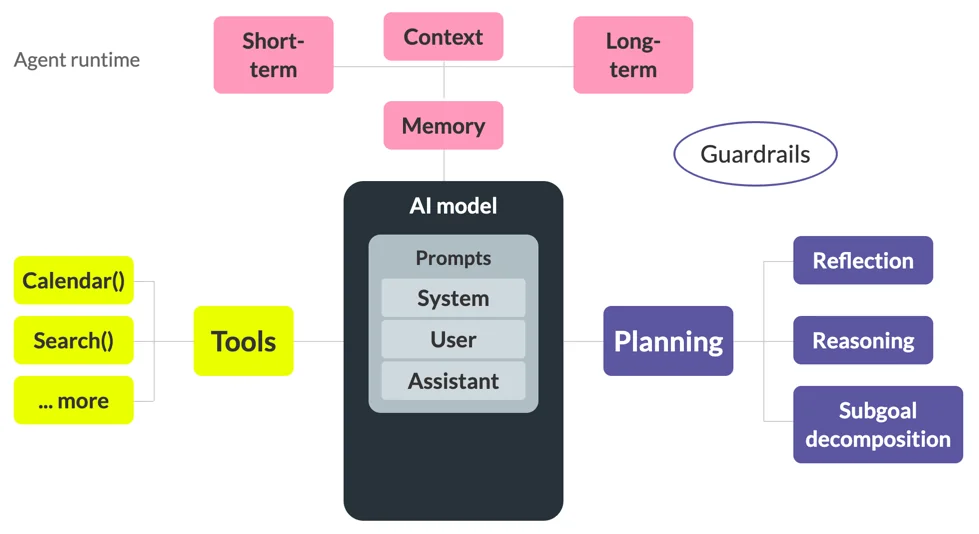
How to Provide Tools to LLM
Providing tools to an LLM means:
- The model is informed about available tools - via the system prompt
- The model learns to generate tool calls when needed through:
- Models that support tool calling are trained on tool-usage examples, using the required format (e.g., special tokens)
- Understanding your tool descriptions - that's why it must be clear, precise, and consistent
Tool Design Principles
|
Handling Partial Failures
Tools must handle partial failures while keeping the system consistent charge payment → reserve inventory → create delivery |
Idempotency & Safe Retries
Tools must safely handle repeated calls (after crashes, timeouts, agent restarts) Sending an email → gets timeout → retry must not send it twice |
Clear Error Messages
Errors must be understandable for LLMs so the agent can decide what to do next Good errors enable the agent to:
|
|
Guidance for Next Steps
Tools can return guidance that helps the agent continue the conversation properly. Examples
|
Structured Outputs
Return structured, machine-readable outputs instead of free-form text. Examples
|
Key Takeaway
A good tool for an AI agent is not just a function It is a reliable contract between the LLM and external systems, designed to withstand failures, retries, and changing environments. |
When is Protocol Needed
|
Yes, Tools have significantly expanded the capabilities of LLMs and enabled them to act as agents |
But
|
→
|
 →
→

What is MCP
On November 25, 2024, Anthropic open-sourced the Model Context Protocol (MCP)
Model Context Protocol (MCP) is an open standard that enables secure, bidirectional connections between AI models and external systems (APIs, tools, data sources)

MCP is the “USB-C port” or “HTTP layer” of the AI ecosystem.
Claude Desktop, LibreChat
IntelliJ, Visual Studio Code
Sire, SuperInterface
Bidirectional
data flow
Standardized protocol
Bidirectional
data flow
PostgreSQL, SQLite, GDrive
Git, Sentry, etc.
Slack, Google Maps, etc.
https://www.anthropic.com/news/model-context-protocol
https://modelcontextprotocol.io/docs/getting-started/intro
Architecture & Roles
Client–server architecture with three roles
Role: Handles UI and connects to servers
Role: Sends prompts and returns model responses
Role: Serves tools, data, prompt templates
Roles: Host
| Orchestrates LLMs and AI workflows | Manages connections: one MCP client per MCP server | Controls UI: User-facing application (e.g., Cursor, custom agents) |
| Security & permissions: auth, limits, policies | User consent: approvals for data sharing & tool use |
Roles: Server
Server = provider of context and capabilities
- A lightweight program exposing tools, context, and capabilities
- Can run locally or remotely
Tasks:
- Registers capabilities
- Processes requests
- Providing context
- Client connection handling
- Sends updates/notifications to clients
Roles: Client
Client = connector between Host and Server
- Protocol communication: JSON-RPC 2.0 requests, secure communication channels
- Capability negotiation: features & versions during initialization
- Tool execution: sends tool calls, returns results
- Real-time updates: handles server notifications
Recap: problems solved
| Problem | Without MCP | With MCP |
|---|---|---|
| Tool reusability | Each team reimplemented the same tools independently. | Tools live in MCP servers — standalone infrastructure components (like microservices). Write once → reuse across many agents and products. |
| API updates & maintenance | All agent teams had to update their integrations manually. | Responsibility shifts to MCP server maintainers. Agents automatically discover updated capabilities during initialization. |
| Scaling and modifications | Components were tightly coupled. Changing one component required rewriting many parts in each agent | Separation of responsibilities. Changes are localized to individual components. |
| Vibe |

|
|
Practice
A few tasks to solve (15-20 min)
Notebook for this intensive: